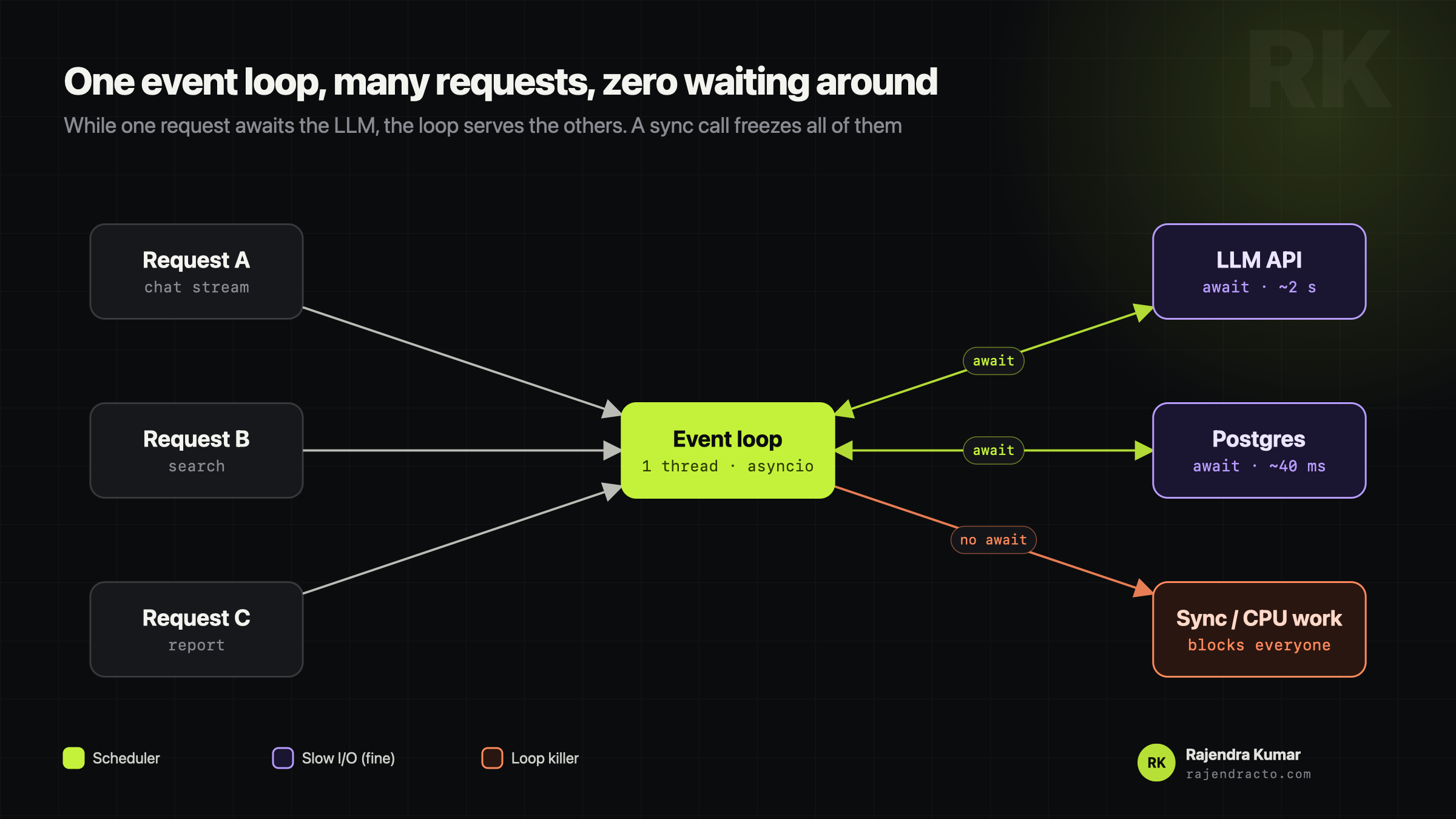
An event loop is a single-threaded manager that lets your server juggle thousands of tasks without standing around waiting for slow things like database queries or LLM API calls. Node.js is built on one. So is Python's asyncio, which FastAPI uses.
The waiter analogy
Picture one waiter in a restaurant.
Without an event loop (blocking): the waiter takes table 1's order, walks to the kitchen and stands there staring at the stove for 15 minutes before even looking at table 2.
With an event loop (non-blocking): the waiter hands table 1's order to the kitchen and goes straight to tables 2, 3 and 4. When the kitchen rings the bell, the waiter picks up table 1's food and serves it.
The kitchen is your database, your vector store, your LLM provider. The waiter is the event loop.
Why it matters so much for AI apps
A call to OpenAI, Anthropic or a vector database spends one to five seconds just waiting on the network. With async def and await, one FastAPI worker can stream answers to hundreds of users at the same time, because during each wait the loop goes off and serves someone else.
@app.post("/chat")
async def chat(req: ChatRequest):
    # Good: the loop serves other users while this waits.
    stream = await client.messages.create(..., stream=True)

    # Bad: blocks the whole loop for every user.
    # time.sleep(2); requests.get(url); heavy_pdf_parse(file)

    # CPU-heavy work goes to a thread or a worker queue.
    text = await asyncio.to_thread(parse_pdf, req.file)
The one trap to mention in an interview
Never run heavy CPU work or a synchronous blocking call inside an async route. There is only one waiter. If they stop to cook, nobody else gets served. Use the async version of the library, asyncio.to_thread, or a background worker like Celery or a queue.
Key takeaways
- 01One thread, many tasks, switching at every
await. - 02Great for I/O-heavy AI apps: LLM calls, databases, streams.
- 03Blocking or CPU-heavy code goes to a thread or a queue.