When clients ask me to integrate AI features into 8-year-old Laravel or legacy monolith apps, their biggest fear is breaking existing business logic or getting locked into heavy technical debt. Ripping and replacing a production monolith for AI is almost always a mistake.
In my years auditing and architecting enterprise monoliths, the most common error I see teams make is executing LLM API calls synchronously inside web request handlers. This instantly degrades response times from 100ms to 3+ seconds and creates fragile API coupling.
Here is the exact architectural blueprint I use to safely integrate Large Language Models (LLMs), RAG pipelines, and automated data extraction into existing Laravel and PHP applications.
The Decoupled Architecture
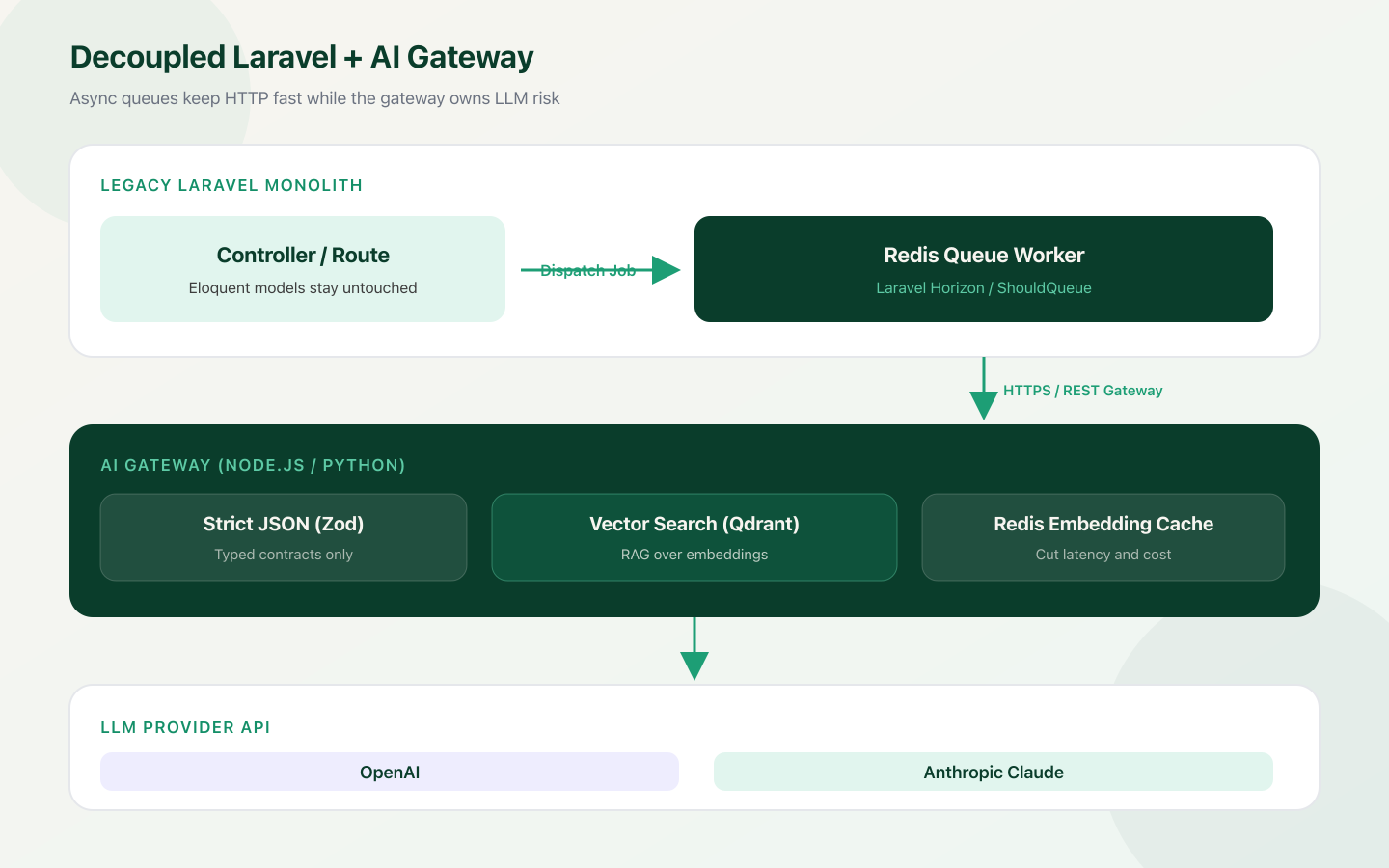
Never place third-party AI SDK calls directly inside your core Eloquent models or HTTP Controllers. Instead, isolate the LLM integration behind asynchronous queues and gateway interfaces.
- Asynchronous Dispatch (Redis / Horizon): Offload all LLM requests to background queue workers (ShouldQueue). Your HTTP responses stay instantaneous while background jobs handle network latency and API retry logic.
- AI Gateway / Middleware: Host prompt templates, vector search indices, and guardrails outside the main framework codebase.
- Strict JSON Schemas: Force LLMs to return structured, deterministic payloads so your existing database schemas are never corrupted by unvalidated text outputs.
Production Code Blueprint: Laravel + AI Middleware
Instead of writing custom parsing code for unstructured LLM text, enforce structured output schemas using Laravel's HTTP client and Spatie Data Transfer Objects (DTOs) or native PHP 8 typed properties.
namespace App\DataTransferObjects;

class TicketAnalysisData
{
    public function __construct(
        public readonly string $urgency, // 'low' | 'medium' | 'high' | 'critical'
        public readonly string $category,
        public readonly string $summary,
        public readonly array $suggestedActions
    ) {}

    public static function fromArray(array $data): self
    {
        return new self(
            urgency: $data['urgency'] ?? 'medium',
            category: $data['category'] ?? 'General',
            summary: $data['summary'] ?? '',
            suggestedActions: $data['suggested_actions'] ?? []
        );
    }
}namespace App\Jobs;
use App\DataTransferObjects\TicketAnalysisData;
use App\Models\SupportTicket;
use Illuminate\Bus\Queueable;
use Illuminate\Contracts\Queue\ShouldQueue;
use Illuminate\Foundation\Bus\Dispatchable;
use Illuminate\Queue\InteractsWithQueue;
use Illuminate\Queue\SerializesModels;
use Illuminate\Support\Facades\Http;
class ProcessTicketWithAI implements ShouldQueue
{
use Dispatchable, InteractsWithQueue, Queueable, SerializesModels;
public int $tries = 3;
public int $backoff = 10; // Backoff strategy for rate limits
public function __construct(public SupportTicket $ticket) {}
public function handle(): void
{
// Call external AI Service Layer / Gateway
$response = Http::timeout(15)
->withHeaders(['X-Api-Key' => config('services.ai_gateway.key')])
->post(config('services.ai_gateway.url') . '/analyze-ticket', [
'ticket_id' => $this->ticket->id,
'content' => $this->ticket->message_body,
]);
if ($response->successful()) {
$analysis = TicketAnalysisData::fromArray($response->json());
// Safely update legacy database model
$this->ticket->update([
'priority' => $analysis->urgency,
'category' => $analysis->category,
'ai_summary' => $analysis->summary,
'processed_at' => now(),
]);
}
}
}Controlling Costs & Latency (The Fractional CTO Perspective)
Adding AI features can quickly cause cloud bills to spike if not properly architected. When advising engineering teams, I advocate for three primary cost-control rules:
- Dynamic Model Tiering: Don't use top-tier models (GPT-4o or Claude 3.5 Sonnet) for simple data parsing. Use lightweight models (GPT-4o-mini, Claude 3.5 Haiku) for 90% of routine tasks like classification, entity extraction, and sentiment routing. Reserve heavy models strictly for multi-step reasoning, complex document synthesis, or code analysis.
- Embedding Caching with Redis: Before sending a query to a vector database or LLM API, compute a hash of the input string and check a fast key-value cache (Redis). If an exact or high-similarity query was run within the last 24 hours, serve the cached answer immediately. This cuts latency to under 10ms and reduces API cost to $0.
- Hard Rate-Limiting and Token Caps: Set strict max-token parameters (max_tokens) on every API request. A bad prompt design or infinite loop in a background job can exhaust monthly API budgets within hours without proper rate limiters.
Where to Start: High-Value Entry Points
If you are evaluating where to introduce AI into your existing monolith, target low-risk, high-return workflows:
| Use Case | Monolith Problem | AI Solution |
|---|---|---|
| Smart System Search | MySQL/PostgreSQL LIKE queries fail on typos and semantic intent | Asynchronous RAG pipeline over vector embeddings |
| Document Processing | Manual data entry from customer PDFs and email support tickets | Structured JSON extraction directly into DB queues |
| Support Automation | Static, rigid FAQ bots that constantly break | Function calling mapped directly to existing REST/GraphQL endpoints |
Final Thoughts
Integrating AI into legacy codebases isn't about replacing your core engineering stack — it's about wrapping intelligent services around the battle-tested systems that already power your business. By enforcing strict schemas, utilizing background queues, and implementing aggressive caching, you can ship modern AI features without accumulating tech debt.