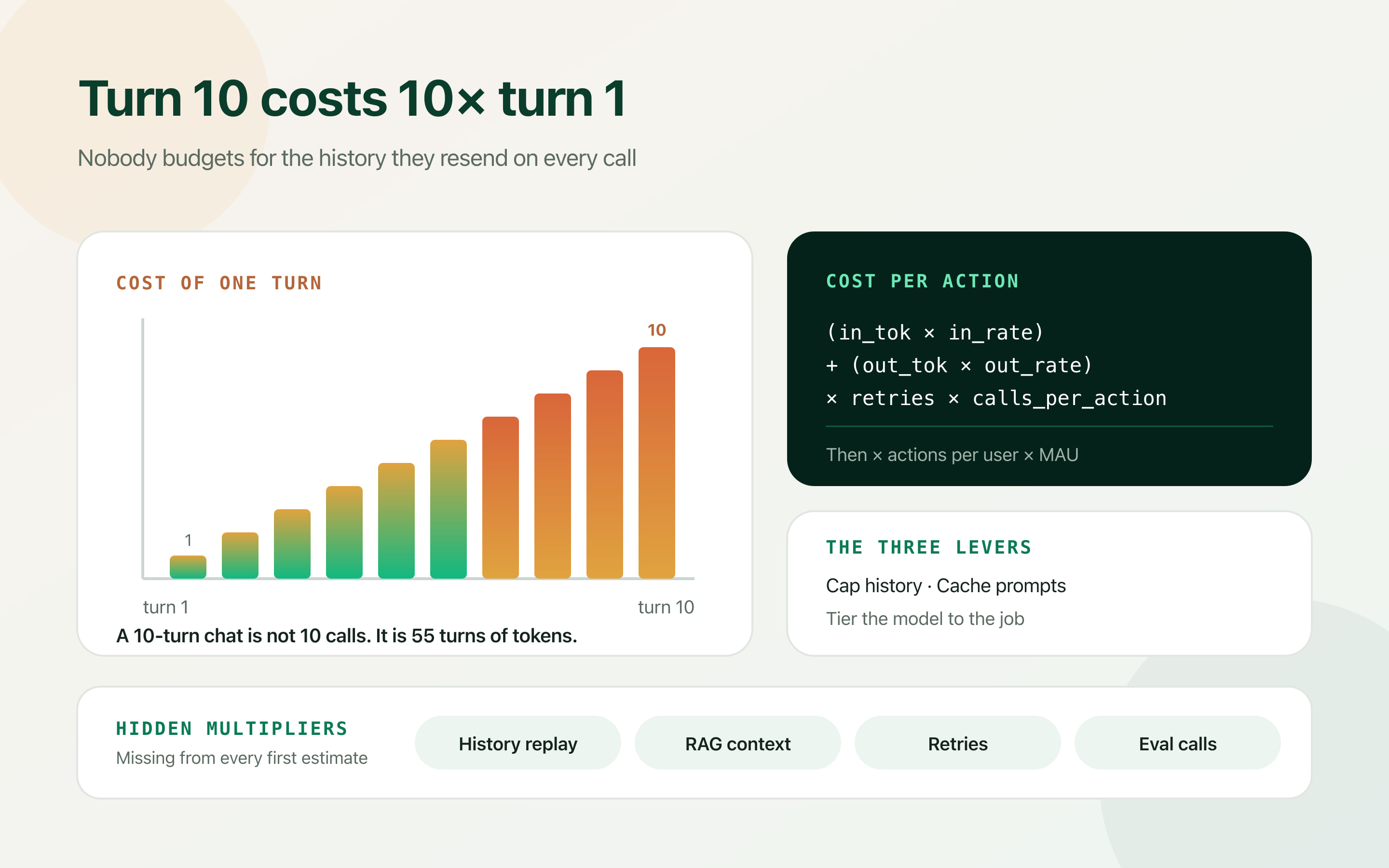
Token pricing is published, public and precise, which is exactly why so many AI budgets are wrong. Knowing the price per million tokens tells you as much about your monthly bill as knowing the price of petrol tells you about your commute.
Every AI feature I have costed has followed the same arc. Someone reads the pricing page, divides by a guessed token count, and reports a number that sounds comfortably small. The prototype confirms it. Then the feature meets real users and the bill lands somewhere between three and thirty times the estimate.
The estimate was not careless. It was built in the wrong unit. Tokens are what you are billed in; they are not what your product does. Your product completes actions — answers a support question, summarises a document, drafts a reply — and each of those actions consumes a variable, mostly hidden number of tokens.
This is a model for estimating that properly, before you build. One important note up front: published rates change, and this article does not quote any, on purpose. Build the model with rates as variables and fill them in from the provider's pricing page on the day you run the numbers.
Estimate in cost per completed action
Start by defining the unit of work your product actually sells. Not “a request” — one user-visible action often takes several API calls — but the thing a user would describe: one support reply, one document summarised, one meeting turned into notes.
Then count what that action really costs. Almost every action involves more than a single call: a classification step to route it, the main generation, sometimes a validation or scoring pass. Each is billed separately, and the cheap ones are easy to forget precisely because they are cheap individually.
Once you have cost per action, the rest is arithmetic you can defend in a board meeting: multiply by actions per user per month, then by your user count, then add a margin for the multipliers in the next section.
If you cannot state the cost of one completed action to within about 20%, you do not have a cost model — you have a token price and an assumption.
type Rates = {
  inputPerToken: number   // from the provider's pricing page, today
  outputPerToken: number
}

type Action = {
  callsPerAction: number  // route + generate + validate = 3, not 1
  inputTokens: number     // system + context + history + user message
  outputTokens: number
  retryFactor: number     // 1.1 means one call in ten is retried
}

function costPerAction(a: Action, r: Rates): number {
  const perCall =
    a.inputTokens * r.inputPerToken + a.outputTokens * r.outputPerToken
  return perCall * a.callsPerAction * a.retryFactor
}

function monthlyCost(
  a: Action,
  r: Rates,
  actionsPerUser: number,
  activeUsers: number
): number {
  return costPerAction(a, r) * actionsPerUser * activeUsers
}

// Run this with your rates BEFORE you build the feature.
// Then run it again against logged usage after two weeks.
// The gap between the two numbers is the thing worth understanding.The multiplier everyone misses: history is quadratic
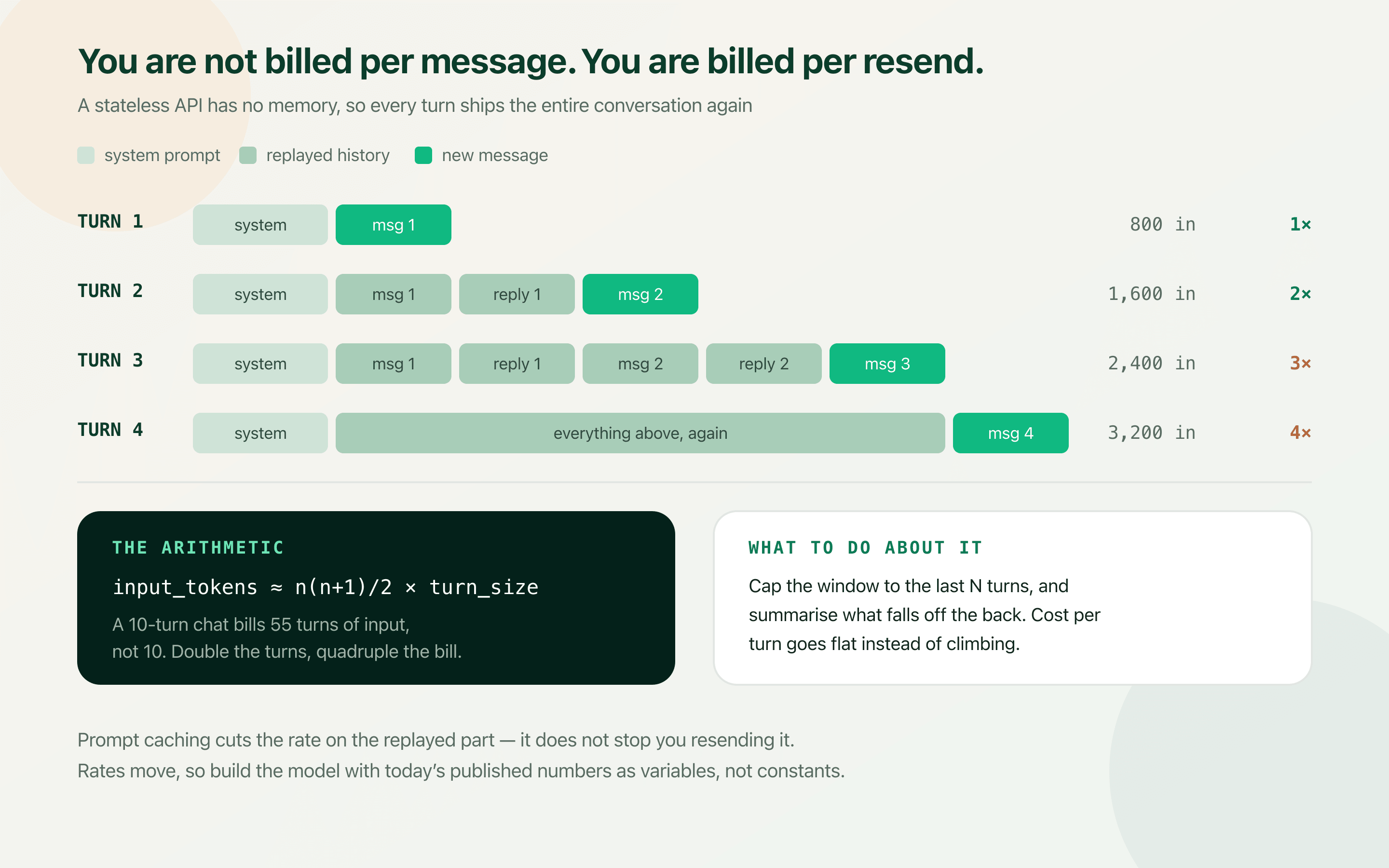
Chat APIs are stateless. The model has no memory of your last call, so to continue a conversation you resend the entire conversation. This is obvious once stated and almost universally left out of estimates.
The consequence is that cost does not grow linearly with conversation length. Turn one sends one message. Turn five sends five. Turn ten sends ten. Total input tokens across an n-turn conversation scale with n(n+1)/2 — so a ten-turn chat bills roughly fifty-five turns of input, not ten. Double the average conversation length and you roughly quadruple the input bill.
This single factor explains most estimates that come in at five to ten times expectation. It is also the easiest to fix, because capping the context window is a handful of lines rather than an architectural change.
const MAX_TURNS = 8

function buildMessages(system: string, history: Msg[], userMessage: string) {
  const recent = history.slice(-MAX_TURNS * 2)   // user + assistant per turn
  const dropped = history.slice(0, -MAX_TURNS * 2)

  return [
    { role: 'system', content: system },
    // One cheap summary stands in for everything older, so cost per turn
    // goes flat instead of climbing with conversation length.
    ...(dropped.length
      ? [{ role: 'system', content: 'Earlier context: ' + summarise(dropped) }]
      : []),
    ...recent,
    { role: 'user', content: userMessage },
  ]
}The four other multipliers
History is the big one, but it is rarely alone. Each of these is individually modest and collectively decisive, and all four are invisible in a prototype where you are the only user.
- The system prompt, on every single call: A carefully engineered 900-token system prompt is not paid once. It is paid on every request, forever. At scale it is often the largest single line in the input budget, and it is the one nobody re-reads after week one.
- Retrieved context: RAG retrieval that injects the top five chunks at 500 tokens each adds 2,500 input tokens to every call. Tuning that to the top three is a 40% cut to the dominant term, and usually costs nothing in answer quality — but only measurement will tell you that.
- Retries and failures: Timeouts, rate limits and malformed JSON all produce calls you pay for and cannot use. A retry factor of 1.1 to 1.3 is realistic; if you are validating structured output and re-prompting on failure, measure it rather than guessing.
- Evaluation and guardrail calls: An LLM-as-judge scoring pass, a moderation check, or a second model verifying the first can quietly double your call count. These are usually added after launch by someone who is not looking at the cost model.
| Factor | Typical effect on input tokens | Cost to fix |
|---|---|---|
| Conversation history replay | n(n + 1)/2 rather than n — often 5–10× | Low — cap the window and summarise the tail. |
| System prompt on every call | Fixed addition to 100% of requests | Low — trim it, and cache it if the provider supports that. |
| RAG context injection | 1,500–3,000 tokens per call | Low — tune top-K and chunk size, measure quality impact. |
| Retries on failure | 1.1–1.3× on everything | Medium — better schemas and validation reduce re-prompting. |
| Eval / judge / moderation calls | 1.5–2× call count | Medium — sample rather than scoring every response. |
Three levers, in order of payoff
Once the model is honest, the optimisations sort themselves by leverage rather than by whichever one somebody read about most recently.
Cap the context window first. It attacks the term that grows fastest, it is a small code change, and it usually has no user-visible cost because conversations rarely depend on what was said forty turns ago.
Cache second. Providers that support prompt caching charge a reduced rate for a repeated prefix, which is exactly the shape of a long system prompt plus stable instructions. Order your messages so the stable part comes first, or you will get no cache hits at all. Separately, cache complete responses for identical requests — in support and documentation tools, the same question genuinely does arrive hundreds of times.
Tier the model third. Most pipelines use one large model for everything because that is how the prototype was written. Routing, classification, extraction and short rewrites usually run acceptably on a much cheaper model, and reserving the expensive one for work that genuinely needs it is often the single biggest line-item reduction available.
The ratios here are illustrative, not a promise — your prompt sizes and traffic mix decide the outcome. The point is the ordering: context first, caching second, model tiering third. That sequence holds across almost every integration I have costed.
| Configuration | Input tokens per action | Relative monthly cost |
|---|---|---|
| Naive: one big model, full history, top-5 RAG | ~14,000 | 1.00× (the baseline everyone launches with) |
| History capped at 8 turns, RAG tuned to top-3 | ~4,200 | ~0.32× |
| Plus prompt caching and a small model for routing | ~4,200 (mostly at cached rates) | ~0.15–0.20× |
Instrument on day one, not after the invoice
Every provider returns token counts in the response. Logging them costs nothing and is the difference between a cost question you can answer in ten minutes and one that takes a week of archaeology.
Tag every call with the feature and the action it belongs to. Without that tag you know your total spend and nothing else; with it you can say which feature costs what per user, which is the only form of the number that supports a decision — to price it, to cap it, or to cut it.
Then alert on cost per action rather than on total spend. Total spend rising with user growth is success. Cost per action rising means something changed in your prompts, your retrieval, or your retry rate, and it is the leading indicator that gives you a week's warning instead of a surprise.
async function trackedCompletion(opts: {
  feature: string        // 'support-reply', 'doc-summary'
  actionId: string       // groups the several calls of one user action
  messages: Msg[]
  model: string
}) {
  const started = Date.now()
  const res = await client.chat.completions.create({
    model: opts.model,
    messages: opts.messages,
  })

  logger.info('llm.call', {
    feature: opts.feature,
    actionId: opts.actionId,
    model: opts.model,
    inputTokens: res.usage?.prompt_tokens ?? 0,
    outputTokens: res.usage?.completion_tokens ?? 0,
    cachedTokens: res.usage?.prompt_tokens_details?.cached_tokens ?? 0,
    ms: Date.now() - started,
  })

  return res
}

// Sum by actionId for true cost per action.
// Sum by feature to find out which one is quietly expensive.
// Alert when cost per action moves, not when total spend moves.Build the spreadsheet before you build the feature
The model above takes an afternoon. It will tell you, before a line of production code exists, whether the feature works at your price point — and that is a different question from whether it works technically.
The failure mode worth avoiding is not an expensive AI feature. It is an expensive AI feature discovered after it has been promised to customers on a flat monthly plan, where every heavy user is now a loss and the only remaining options are all bad ones.
Run the numbers at three user counts: today, ten times today, and the number in your pitch deck. If the third one does not work, you have learned something important while it is still cheap to act on.
Frequently asked questions
How do I estimate OpenAI API costs before building a feature?
Work in cost per completed action rather than per token. Define one user-visible action, count every API call it needs including routing and validation, estimate input and output tokens per call, multiply by a retry factor, then scale by actions per user and monthly active users. Take the input and output rates from the provider's current pricing page rather than from memory, because they change.
Why is my OpenAI bill so much higher than I estimated?
The usual cause is conversation history. The API is stateless, so every turn resends the whole conversation, which means input tokens across an n-turn chat scale with n(n+1)/2 rather than n — a ten-turn conversation bills about fifty-five turns of input. Add the system prompt on every call, retrieved RAG context, retries and any evaluation calls, and a factor of five to ten over a naive estimate is entirely normal.
Does prompt caching actually reduce cost?
It reduces the rate you pay on a repeated prefix, which helps a lot when a long system prompt and stable instructions are identical across calls. It does not reduce the number of tokens you send. The ordering matters: the cacheable, stable content must come first in the message list, otherwise nothing matches and you get no discount at all.
Should I use a cheaper model to save money?
For part of the pipeline, usually yes. Routing, classification, extraction and short rewrites often run acceptably on a small model, and reserving the large one for the work that genuinely needs it is frequently the largest single saving available. Do it after capping context, though — model tiering requires quality testing on every path you change, while capping the history window generally does not.
What should I log to track AI costs properly?
Prompt tokens, completion tokens, cached tokens, model and latency on every call, tagged with the feature and an action id that groups the several calls making up one user action. That lets you compute true cost per action and cost per feature. Alert on cost per action rather than total spend — total spend rising with growth is healthy, cost per action rising means something regressed.
How much should I budget per user for an AI feature?
There is no general answer, which is the point of building the model. What matters is the comparison against what that user pays you. Run the numbers at today's user count, ten times it, and your target — if the margin only works at small scale, you want to know before the feature ships on a flat-rate plan rather than after.