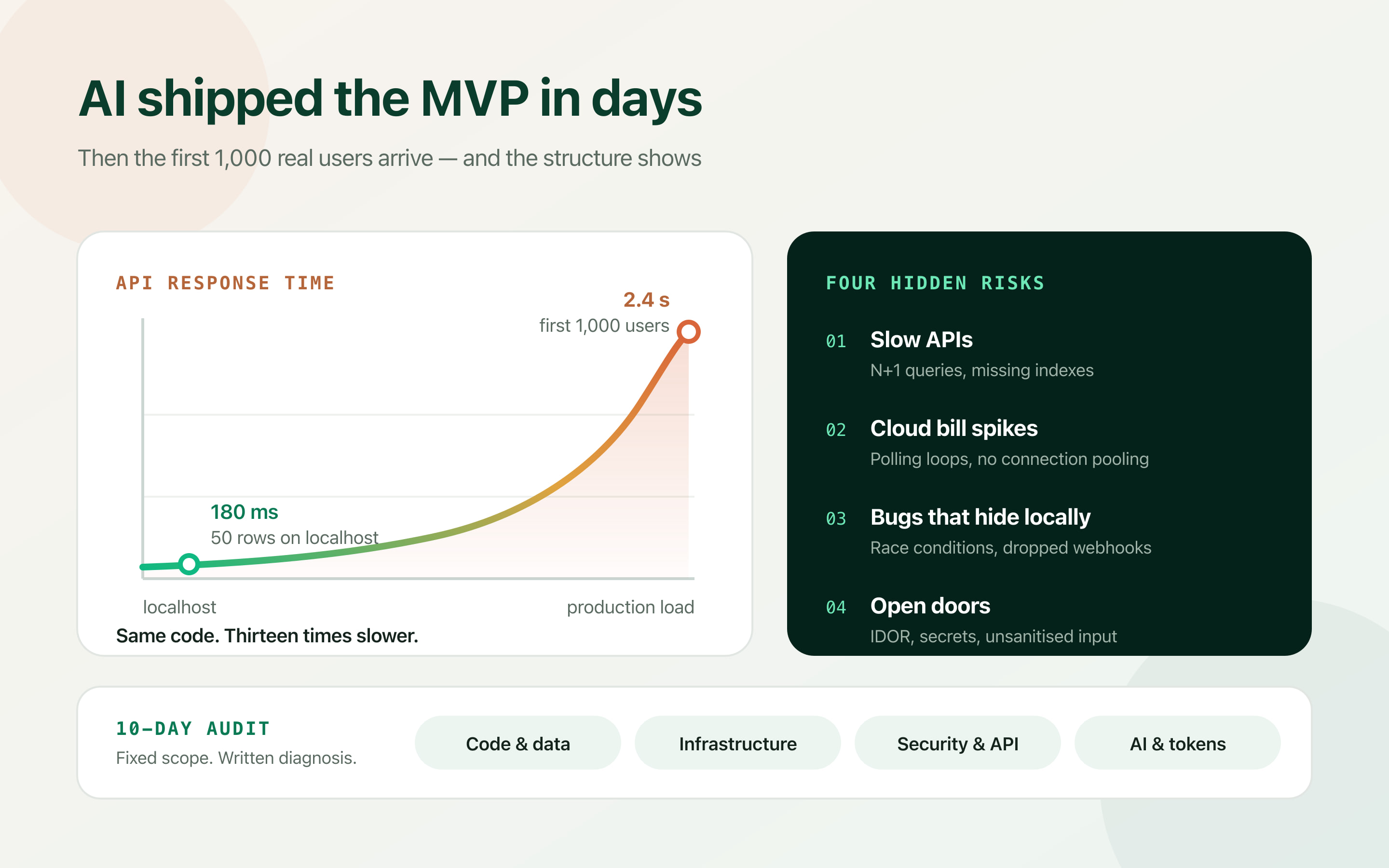
Getting your MVP to launch is only step one. Making sure it survives its first 1,000 active users is a different engineering problem — and it is the one most AI-generated codebases have not solved.
AI code generators have fundamentally changed software development. With tools like Cursor, Claude Code, GitHub Copilot and v0, non-technical founders and small teams can launch functional software in days rather than months.
That speed comes with a hidden cost: AI writes code that works locally, but breaks under production realities. When an agent generates an application, it optimises for immediate functionality — not for security, memory efficiency, database index design, or the edge cases that only appear under concurrency.
So the structural issues stay latent. They surface all at once when real users arrive: database deadlocks, soaring cloud bills, silent data corruption, or a security breach. Below are the four risks I find most often in AI-built codebases, and what a fixed-scope audit does about them.
Architectural bottlenecks and slow APIs
AI coding agents solve isolated problems one function at a time. They rarely reason about the full application architecture, relational query efficiency, or memory footprint across a request. Each individual function looks correct in review. The system built out of them does not hold.
The pattern below is the single most common one I see. Both versions return identical data and pass identical tests. One issues a query per row.
- The N+1 query problem: Fetching related data inside a loop rather than batching the request, so an endpoint that costs 1 query with 10 rows costs 1,001 queries with 1,000 rows.
- Missing database indexes: Schemas written quickly that perform fine against 50 local test records, then fall to sequential scans once real tables hold hundreds of thousands of rows.
- Uncached heavy reads: Running the same expensive computation or aggregate query on every page load instead of putting Redis or edge caching in front of a result that changes once an hour.
Real-world impact: an endpoint that returns in 180ms during testing can spike to 2.4s under real user load. That is not a slow page — that is churn, and it usually arrives the same week your marketing does.
// What the agent wrote — one query, then one more per order
const orders = await db.order.findMany({ where: { userId } });
for (const order of orders) {
  order.items = await db.item.findMany({ where: { orderId: order.id } });
}
// 1,000 orders => 1,001 round trips to the database

// What it should be — two queries, regardless of row count
const orders = await db.order.findMany({
  where: { userId },
  include: { items: true },
});Silent cloud bill spikes
AI tools lean heavily on unoptimised infrastructure patterns. Without explicit constraints in the prompt, an assistant will reach for high-memory serverless instances, unthrottled polling, and over-provisioned database tiers — because those are the configurations that make the example work, not the ones that make it cheap.
The bill is the last place this shows up. By then the pattern is spread across a dozen files.
- Unbounded polling loops: A client that hits the backend every two seconds for a status that changes twice a day. With 500 concurrent users that is 21 million requests a month for almost no information.
- Inefficient third-party API usage: Sending the full document to an LLM on every request instead of caching the embedding or the completion, so you pay for the same tokens repeatedly.
- Missing connection pooling: Serverless functions opening a new database connection per invocation until you either exhaust the connection limit or pay for a tier large enough to survive it.
| Pattern | Looks like | What it actually costs |
|---|---|---|
| 2-second polling | A responsive-feeling dashboard | Constant load floor that scales linearly with signups — replace with webhooks or SSE. |
| Uncached LLM calls | Fast to build, works first try | The same prompt billed thousands of times a day; a response cache often cuts it by 60–90%. |
| No connection pooling | Fine until concurrency rises | Database tier upgrades bought to solve a problem a pooler fixes for free. |
Production bugs that won’t reproduce locally
An AI generator tests code in a clean, isolated, single-user environment. It rarely accounts for race conditions, network dropouts, retries, or two users changing the same state at the same moment.
Once real people use the application simultaneously, non-deterministic bugs start appearing — and they are the expensive kind, because the first three days are spent trying to reproduce them at all.
- Background jobs stalling: A month-end job that dies halfway through because nothing made it idempotent or restartable, leaving half-written state behind.
- Dropped payment webhooks: A checkout flow that assumes the webhook arrives exactly once, in order, and never while another request holds the row.
- State mismatches: Database rows that disagree with each other in ways that simply cannot happen on a developer machine with one user and no latency.
If a production bug won’t reproduce on localhost, the difference is almost never the diff — it is the data volume, the concurrency, or the network. Reproduce it against a copy of real data before touching the code.
Vulnerabilities and compliance risk
AI tools learn from millions of public repositories — including a great deal of outdated and vulnerable code. Without human review, a few specific holes show up again and again.
Broken object-level authorization is the one I find most often, and it is the easiest to miss in a demo: every test is run as the account that owns the data.
- Hardcoded secrets: API keys committed into the repository or shipped to the browser bundle because the environment variable was never wired up.
- Broken authorization controls: Letting a signed-in user read another user’s records simply by changing an ID in the URL — an IDOR vulnerability that authentication alone does not prevent.
- Unsanitised inputs: String-interpolated queries and unescaped rendering, exposing the backend to SQL injection or stored cross-site scripting.
If you plan to process payments, store health data, or pursue SOC 2 or HIPAA compliance, flaws embedded in the initial MVP build do not stay technical problems. They become the reason an enterprise deal stalls in security review.
// Vulnerable — the user is logged in, so the handler assumes the row is theirs
app.get("/api/invoices/:id", requireAuth, async (req, res) => {
  const invoice = await db.invoice.findUnique({ where: { id: req.params.id } });
  res.json(invoice); // /api/invoices/1042 returns someone else's invoice
});

// Fixed — ownership is part of the query, not an assumption
app.get("/api/invoices/:id", requireAuth, async (req, res) => {
  const invoice = await db.invoice.findFirst({
    where: { id: req.params.id, userId: req.user.id },
  });
  if (!invoice) return res.status(404).end();
  res.json(invoice);
});What a 10-day production audit fixes
A production codebase audit is not a 60-page theoretical document telling you to rewrite your app from scratch. A senior architectural audit is targeted: find the handful of issues that will actually take the system down or drain the budget, and price the fixes.
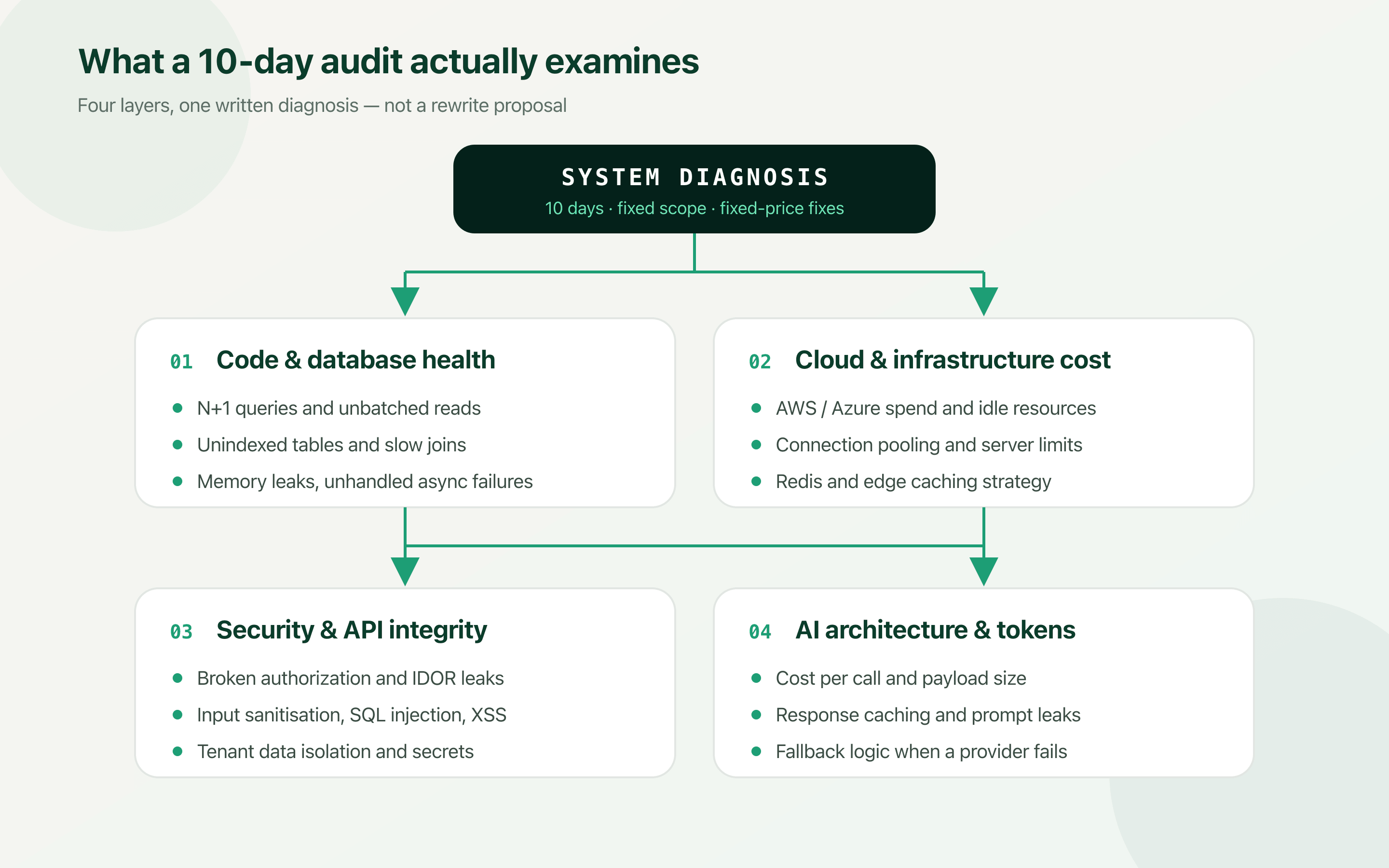
A thorough 10-day audit examines four layers.
- Codebase and database health: Identifying slow queries, missing indexes, memory leaks and unhandled async failures before your users find them for you.
- Cloud and infrastructure cost control: Auditing the AWS or Azure setup to remove idle resources, right-size instances, and cut the monthly operational overhead.
- Security and API integrity: Hardening authentication flows, object-level permissions and input validation so client data stays isolated.
- AI architecture and token usage: Streamlining LLM pipeline calls, caching responses and structuring fallbacks to reduce the cost and failure rate per API call.
| What you are seeing | Where the audit looks first |
|---|---|
| Pages got slower as signups grew | Query counts per request, index coverage on the tables that grew, and what is being computed on every load. |
| The cloud bill doubled without a traffic jump | Polling intervals, function memory settings, connection handling, and cache hit rates on third-party calls. |
| Errors only some users can trigger | Concurrency and data volume — reproduced against a copy of production data, not a local fixture. |
| A customer asked for a security review | Authorization checks per endpoint, secret handling, input validation, and tenant data isolation. |
Don’t hire a full team — fix the system first
When software starts slowing down or breaking, founders often assume the answer is more full-time engineers or a $20,000 rewrite. Both are expensive ways to avoid a diagnosis.
In most cases you do not need a rewrite. You need a senior engineer who has already solved these exact production failures to find the root cause and fix the bottleneck — usually a much smaller change than the panic suggests.
If your MVP is live or about to launch, verify the system before you scale the marketing spend behind it. Ten days gives you a written diagnosis of what is working, what is vulnerable, and fixed-price options to harden it for real traffic.
Shipping fast with AI is the right call. Scaling fast on unaudited AI output is how a good launch becomes an incident.
Frequently asked questions
What is a codebase audit?
A codebase audit is a fixed-scope review of a live application by a senior engineer, covering code and database health, cloud infrastructure cost, security and API integrity, and — for AI-powered products — LLM pipeline design. It produces a written diagnosis of what will break or overspend at scale, ranked by impact, with a fixed price against each fix.
Why does AI-generated code need auditing if it works?
AI coding agents optimise for immediate functionality in a clean, single-user, small-data environment. They do not reason about query counts across a request, index coverage on tables that will grow, concurrency, or object-level authorization. Code that passes every local test can still issue 1,001 database queries per request or return another customer's record when an ID in the URL is changed.
Do I need to rewrite my AI-built MVP before scaling?
In most cases, no. A rewrite discards working product logic to fix a handful of structural problems. The usual outcome of an audit is a short list of targeted fixes — batching queries, adding indexes, caching heavy reads, adding authorization checks, pooling database connections — that cost a fraction of a rebuild and take days rather than months.
How long does a production codebase audit take?
Ten working days for a typical MVP. That covers reading the codebase, reproducing the reported failures against realistic data volumes, reviewing the cloud and database configuration, checking authorization and input handling on every endpoint, and writing up the findings with fixed-price options against each one.
When should I audit — before or after launch?
Before you spend money driving traffic. The failure modes in an AI-generated MVP are load-dependent, so they surface exactly when a marketing push starts working. Auditing while traffic is still low means fixing them on a quiet system rather than during an incident.
Can I just run the audit myself with an AI tool?
AI review tools are useful for catching per-file issues such as unsanitised inputs or obvious dead code. They are weak at the failures that matter most here, because those are system-level and data-dependent: an N+1 query looks correct in isolation, a missing index is invisible without the production row counts, and a race condition does not exist in a single-user test run.