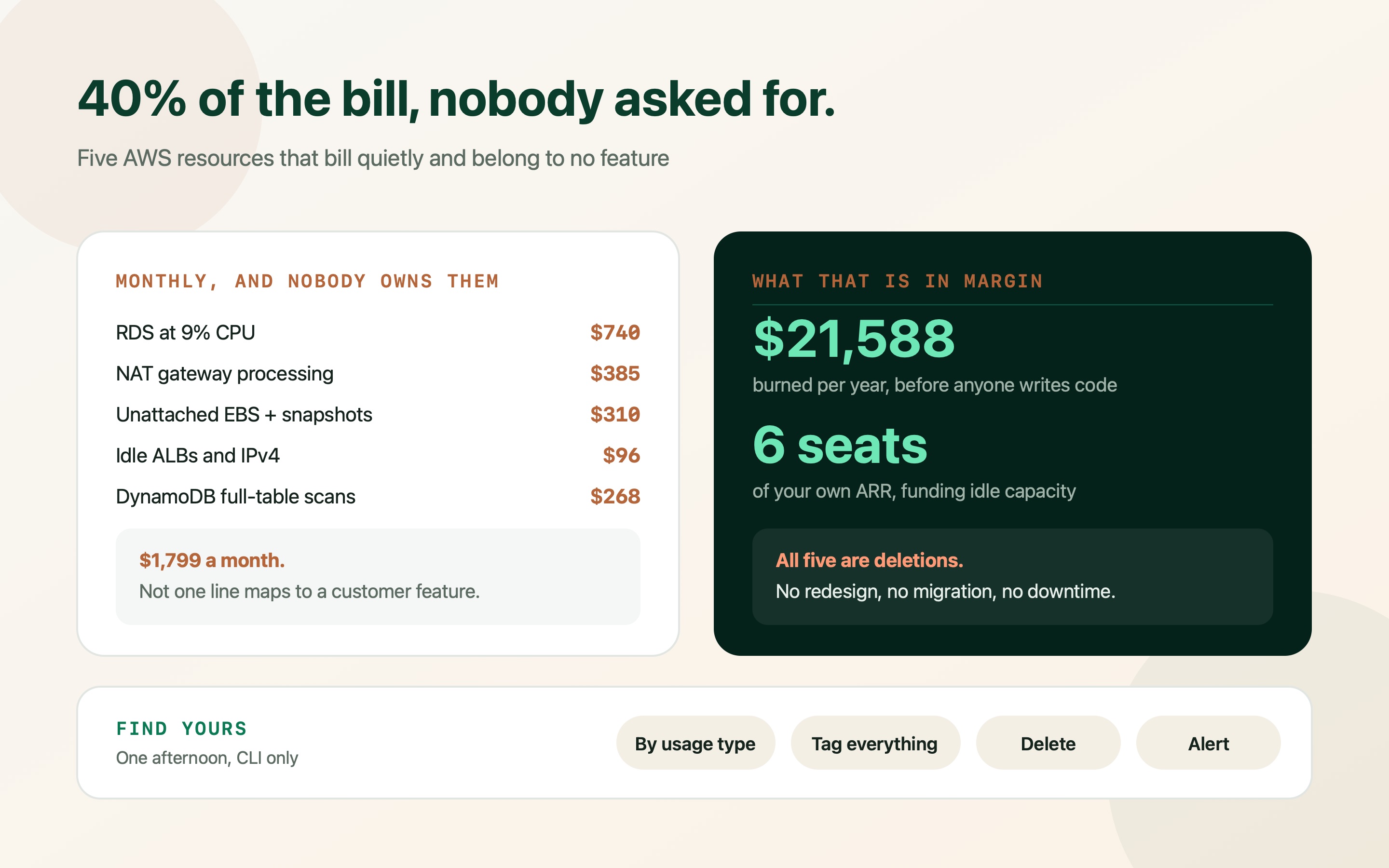
Your engineers did not over-provision on purpose. AWS simply keeps charging for things after the reason for them has gone, and nobody owns the job of noticing.
This one is written for the person reading the invoice rather than the person who created the resources. You do not need to know what a NAT gateway is to act on it — you need to know what it costs, how to check whether you have an expensive one, and what to ask for.
The pattern is always the same. Each line was created by a reasonable decision: a database sized for a launch that has since changed shape, a disk attached to a server that was replaced, a network component added by a template nobody read. The decision expired. The billing did not.
Five resources account for most of it in the early-stage bills I look at, and together they commonly run to thirty or forty percent of the total. Every one of them is a deletion or a setting — no migration, no downtime, no rewrite.
Why a bill grows while nothing changes
Cloud providers charge for existence, not for use. A server that serves no traffic costs the same as one that is busy. A disk attached to nothing bills identically to one holding your production data. That single fact explains most of what follows.
Two organisational gaps turn that into money. Nobody owns deletion — creating infrastructure is part of shipping, removing it is nobody's ticket. And nothing is tagged, so when the bill is questioned, no one can say which resource belongs to which system, which makes deleting anything feel risky.
So before the list: ask your team for two things. A tag on every resource naming its environment and owner, and the Cost Explorer view grouped by *usage type* rather than by service. Grouped by service, the answer is “EC2: $1,900”, which is not actionable. Grouped by usage type it separates into gateway hours, data processing, disk, snapshots and addresses — five different conversations with five different fixes.
The single most useful question to ask about any line on the bill: which customer-facing thing stops working if we delete this? If nobody can answer within a day, that is your answer.
Sink 1 — the database that is four times bigger than it needs to be
The most expensive single line in most early-stage bills is a managed database chosen before anyone knew the shape of the traffic. It was sized for the launch everyone hoped for, and it has been running at single-digit CPU ever since.
The check takes two minutes: look at average and peak CPU over the last fortnight in CloudWatch. Consistently under fifteen percent with peaks that never trouble it means the instance is larger than the work. Memory matters too — a database that fits its working set in memory is fast, so the right move is often one size down rather than four, done with evidence rather than optimism.
Two specific wastes usually sit alongside it. Multi-AZ on non-production doubles the instance cost to protect a staging database whose loss would cost an afternoon. And read replicas that nothing reads from cost a full instance each, plus a second copy of the storage.
# Every database, its size, storage and whether it is paying for Multi-AZ
aws rds describe-db-instances \
  --query 'DBInstances[].[DBInstanceIdentifier,DBInstanceClass,
           AllocatedStorage,MultiAZ,ReadReplicaDBInstanceIdentifiers]' \
  --output table

# Two weeks of CPU for one of them
aws cloudwatch get-metric-statistics \
  --namespace AWS/RDS --metric-name CPUUtilization \
  --dimensions Name=DBInstanceIdentifier,Value=prod-db \
  --start-time 2026-09-07T00:00:00Z --end-time 2026-09-21T00:00:00Z \
--period 86400 --statistics Average Maximum --output table| Check | Healthy | Worth acting on |
|---|---|---|
| Average CPU, 14 days | 35–65% | Under 15% with unremarkable peaks |
| Multi-AZ on staging or demo | Off | On — you are paying twice for a disposable environment |
| Read replicas | Serving real read traffic | Present, but nothing routes to them |
| Storage allocated | Close to what is used | Autoscaled up during a one-off import and never reduced |
Sink 2 — the network component that charges by the gigabyte
A NAT gateway lets servers on a private network reach the internet. It is a sensible thing to have. It is also billed twice: an hourly charge of roughly thirty-two dollars a month per gateway, plus a per-gigabyte charge for everything that passes through it.
That second charge is where it turns expensive, because most teams have no idea what is flowing through it. Container images pulled on every deploy, backups written to S3, logs shipped to a vendor, one chatty service talking to another across availability zones — all of it metered. Three gateways in three availability zones, each processing a few hundred gigabytes, is a four-figure annual line nobody chose.
The fix is unglamorous and effective. A VPC endpoint for S3 costs nothing and removes S3 traffic from the gateway entirely; endpoints for ECR do the same for container pulls. In non-production, one gateway is almost always enough instead of one per zone.
- Add a gateway endpoint for S3: Free, takes minutes, and removes what is usually the largest single source of NAT data processing.
- Consolidate non-production to one gateway: Multi-zone redundancy on a staging environment is paying for an availability guarantee nobody needs.
- Ask what is actually flowing through it: VPC flow logs answer this. The surprise is usually deploys, backups or a log shipper, not customer traffic.
Sink 3 — disks and backups of servers that no longer exist
When a server is terminated, its disk is not always deleted with it. Those orphaned volumes keep billing per gigabyte per month, indefinitely, attached to nothing. The same is true of snapshots: they are cheap individually, they accumulate for years, and no one has ever been given the job of deciding which can go.
This is the easiest money on the list. An unattached volume has, by definition, no running system depending on it. Snapshot it if the contents are unclear, then delete it — and set a lifecycle policy so the next generation expires on a schedule instead of forever.
One multiplier worth knowing: storage is charged again for every copy. A Multi-AZ database keeps a second copy, every read replica keeps its own, and every snapshot holds the data it captured. Reducing the primary reduces all of them at once, which is why it is worth more than the headline number suggests.
# Disks attached to nothing, largest first
aws ec2 describe-volumes --filters Name=status,Values=available \
  --query 'sort_by(Volumes,&Size)[*].[VolumeId,Size,VolumeType,CreateTime]' \
  --output table

# Manual snapshots older than a year (automated ones expire on their own)
aws ec2 describe-snapshots --owner-ids self \
  --query 'Snapshots[?StartTime<=`2025-09-21`].[SnapshotId,VolumeSize,StartTime,Description]' \
  --output table

# Then set a retention policy so this does not regrow:
# Data Lifecycle Manager, or the backup tool you already pay for.Sink 4 — load balancers and addresses with nothing behind them
A load balancer bills by the hour whether or not anything is connected to it, at roughly sixteen to twenty-five dollars a month each once modest traffic charges are included. Environments get torn down and their load balancers survive, so most accounts I look at have at least one pointing at nothing.
Public IPv4 addresses joined this category in February 2024, when AWS began charging for every one of them — around three and a half dollars a month each. Individually trivial; a dozen forgotten addresses across old environments is not.
Both are visible in one command each, and both are safe to remove once you confirm nothing resolves to them. The check is whether the load balancer has any healthy targets and whether the address is associated with a running instance.
# Load balancers and whether anything is registered behind them
aws elbv2 describe-load-balancers \
  --query 'LoadBalancers[].[LoadBalancerName,DNSName,State.Code,CreatedTime]' \
  --output table
# then, per load balancer:
aws elbv2 describe-target-health --target-group-arn <arn> --output table

# Public addresses associated with nothing
aws ec2 describe-addresses \
  --query 'Addresses[?AssociationId==null].[PublicIp,AllocationId,Tags]' \
--output tableSink 5 — the table that scans when it should look up
DynamoDB is billed for the work it does, and the work it does depends on how the table is queried. A lookup that uses the table's key is cheap and constant. A query that filters on a field which is not part of a key forces a scan of the whole table, and you are billed for every item read before the filter discards it.
In plain terms: the same feature can cost fifty cents a month or five hundred, depending on whether the right index exists. As the table grows the cost grows with it, which is why this one arrives looking like sudden inexplicable growth on an otherwise flat bill.
The check is the ratio between items scanned and items returned. If a query scans forty thousand items to return twenty, it needs a secondary index on the field it filters by. That is a configuration change, not a rewrite, and the cost drops immediately.
| Symptom | What it means | Fix |
|---|---|---|
| Read cost rising with table size, traffic flat | Queries are scanning rather than looking up | Add a global secondary index on the filtered attribute. |
| Provisioned capacity far above consumption | Capacity bought for a peak that never comes | Switch to on-demand, or right-size with autoscaling. |
| On-demand cost spiking at known times | A batch job hammering the table | Move the batch to provisioned capacity, or throttle it. |
| Large items, high read counts | You are billed per 4KB read — big items cost more per lookup | Store blobs in S3 and keep the pointer in the table. |
The one-afternoon sweep
All five checks fit into a single session. Run them, write the numbers down, and decide what goes — the point of doing them together is that the total is what makes the case, not any individual line.
Do the deletions in the safest order: things attached to nothing first (volumes, addresses, load balancers with no targets), then retention policies, then configuration changes like Multi-AZ on staging, then the instance resize with a maintenance window. Nothing in that sequence needs a deploy.
Snapshot anything ambiguous before deleting it. A snapshot costs a few dollars a month and removes the only real argument against acting.
| Sink | Typical monthly | Effort | Risk |
|---|---|---|---|
| Over-provisioned database | $400–900 | One maintenance window | Low, reversible |
| NAT gateway processing | $200–500 | An hour, add endpoints | None |
| Unattached disks and old snapshots | $150–400 | An afternoon | None once snapshotted |
| Idle load balancers and addresses | $50–150 | Minutes | None once targets checked |
| DynamoDB scans | $100–600 | Add an index | Low |
Making it stay fixed
Cost work decays. Without an owner and a ceiling, a cleaned-up bill reinflates over about two quarters as new services arrive and old ones are never retired. Three habits keep it flat, and none of them requires a FinOps function.
Set a budget alert with both a monthly amount and a forecast threshold, so you hear about an overrun in week two rather than on the invoice. Turn on Cost Anomaly Detection, which is free and catches step changes a budget misses. And put one number in front of the team each month: infrastructure cost per active customer.
That last number is the one that matters commercially. An absolute bill going up is expected — you are growing. Cost per customer going up means something in the architecture scales linearly with customers, and finding that early is worth more than any single deletion on this list.
Cost per active customer, tracked monthly, is the whole discipline in one metric. Falling as you grow means leverage. Rising means an architectural problem you want to find now rather than at your next raise.
Frequently asked questions
How much of a typical early-stage AWS bill is waste?
In the accounts I review, commonly thirty to forty percent — and almost none of it is deliberate. It concentrates in resources that bill for existing rather than working: an oversized database, NAT gateway data processing, disks and snapshots outliving their servers, idle load balancers and addresses, and query patterns that scan instead of look up.
What is a NAT gateway and why is it expensive?
It lets servers on a private network reach the internet. It costs roughly thirty-two dollars a month just to exist, plus a per-gigabyte charge on everything passing through it — container image pulls, backups to S3, log shipping. Adding a free VPC endpoint for S3 removes the largest slice of that traffic, and non-production rarely needs more than one gateway.
Is it safe to delete unattached EBS volumes?
An unattached volume has no running server using it, so deleting it cannot break a live system. The only risk is losing data someone still wants. Snapshot anything whose contents are unclear before deleting — a snapshot costs a few dollars a month and removes the argument entirely.
Should I buy Reserved Instances or Savings Plans to cut the bill?
Not first. A commitment is a discount on whatever shape your infrastructure is in, so buying one before cleaning up locks in the waste for a year or three. Delete, right-size and schedule first, then cover the steady floor with a one-year no-upfront Compute Savings Plan.
Who should own cloud cost in a small company?
One named engineer, with a monthly number they report. Not a committee, and not the CFO alone — the decisions are technical, so the accountability has to sit with someone who can act on them. Fifteen minutes a month reviewing cost per customer is enough at this stage.
How quickly can these five be fixed?
Most of it in a day. Unattached volumes, old snapshots, idle load balancers and unassociated addresses can go immediately. VPC endpoints and Multi-AZ on non-production are configuration changes. Only the database resize needs a maintenance window, and a DynamoDB index can be added while the table stays live.