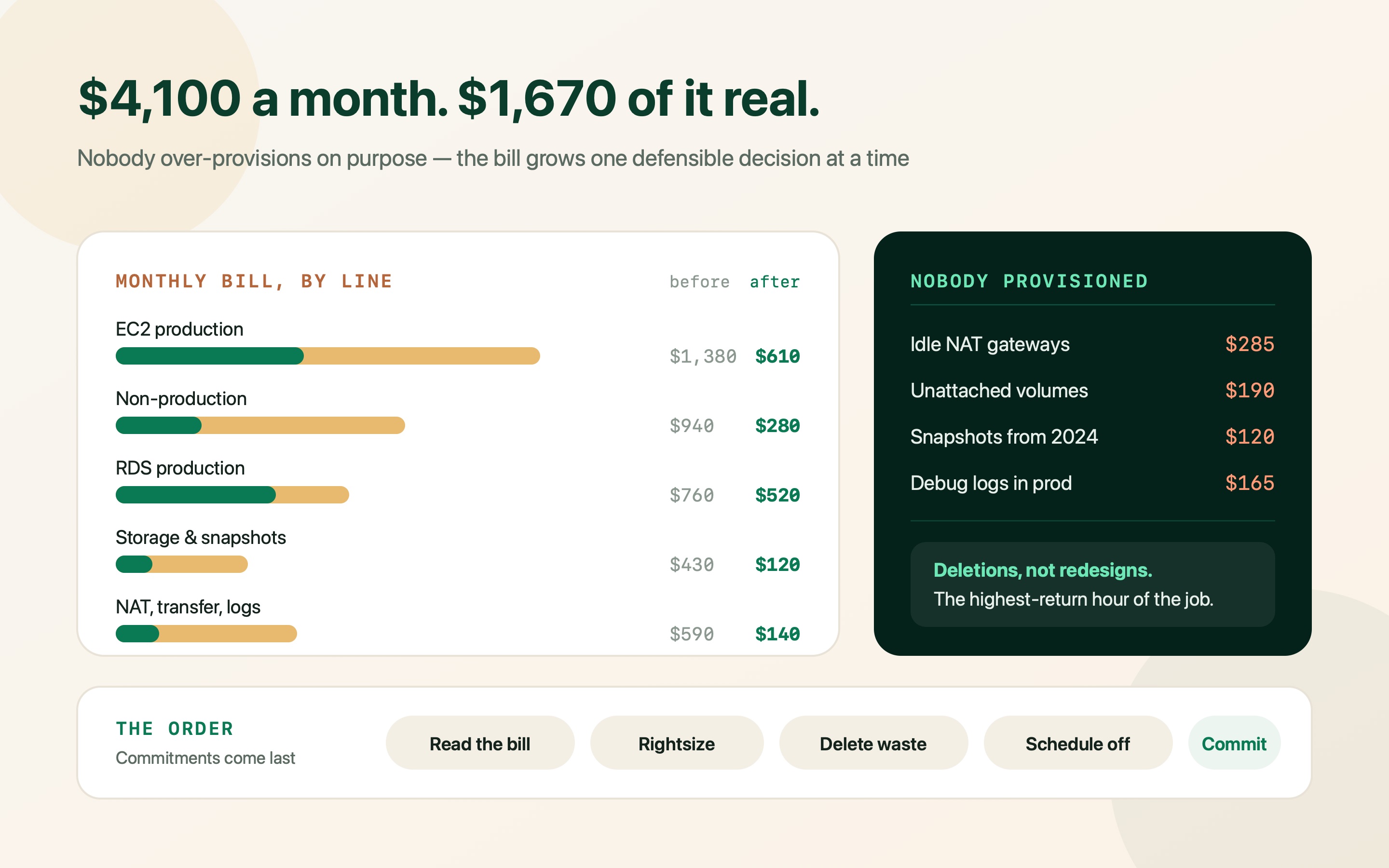
Nobody at seed stage over-provisions on purpose. The bill grows because every individual decision was defensible at the time, and because AWS charges you for things nobody remembers creating.
The conversation usually starts with a number and a shrug. Four thousand dollars a month, maybe six, growing faster than revenue, and no one on the team can say which service is responsible for more than a rough third of it.
That is not incompetence. Early-stage teams are optimising for shipping, and the instance that was right for launch traffic is still running eighteen months later next to a staging environment nobody switches off. Meanwhile AWS quietly bills for idle NAT gateways, unattached volumes, two-year-old snapshots and log ingestion that nobody has ever read.
What follows is the order I work in, cheapest and most reversible first. Rightsizing before commitments, deletions before rearchitecting, and measurement before all of it — because a Savings Plan bought on top of over-provisioned infrastructure just locks in the waste for a year.
Read the bill properly before you change anything
Cost Explorer grouped by service is the view everyone opens, and it is nearly useless for deciding what to do. “EC2-Other: $780” is not an action. Group by usage type instead, and the same money resolves into NAT gateway hours, EBS volume GB-months, snapshot storage and data processing charges — four completely different fixes.
Then do the thing most teams skip: turn on tagging and give it two weeks. Without tags you cannot say whether that RDS instance belongs to production, to a demo environment, or to a migration that finished last year. With them, the argument about what to delete takes ten minutes instead of a fortnight.
Finally, enable the Cost and Usage Report or at least Cost Anomaly Detection. You want the alert that says “something changed on the 14th”, because the most expensive mistakes are the ones that only become visible in a monthly total.
- Group by usage type, not service: NatGateway-Hours, NatGateway-Bytes, EBS:VolumeUsage.gp2 and DataTransfer-Regional-Bytes each have a different fix. Service-level totals hide all four inside EC2.
- Tag environment, owner and service: Three tags are enough. Enforce them with a tag policy so new resources cannot be created untagged, then treat untagged spend as a deletion candidate.
- Compare month over month, not against a budget: The interesting question at this stage is what changed and when, which points at a deploy or a new feature far faster than any absolute number.
aws ce get-cost-and-usage \
  --time-period Start=2026-08-01,End=2026-09-01 \
  --granularity MONTHLY \
  --metrics UnblendedCost \
  --group-by Type=DIMENSION,Key=USAGE_TYPE \
  --query 'ResultsByTime[0].Groups[?Metrics.UnblendedCost.Amount>=`20`]
           .[Keys[0],Metrics.UnblendedCost.Amount]' \
  --output table

# Run the same call grouped by Key=SERVICE for the headline,
# then by TAG key for ownership. The usage-type view is the one
# that tells you what to actually do.Rightsize EC2 — the instance you sized for launch day
The single most common finding is a production instance averaging six to twelve percent CPU, chosen eighteen months ago on a guess about launch traffic. It has never been revisited because nothing is broken, and nothing is broken because it is four times too large.
Use Compute Optimizer rather than intuition: it reads fourteen days of CloudWatch metrics and recommends a size, flagging where memory data is missing. Where it hesitates, pull p95 CPU and network yourself — but do look at p95 rather than the average, because the average of a bursty workload will talk you into an instance that falls over at lunchtime.
Two structural moves usually beat pure rightsizing. Graviton instances (the g-suffix families) price roughly ten to twenty percent below the equivalent x86 size, and for a typical Node, Python, Java or Go service the port is a base-image change and a rebuild. And gp3 volumes cost about twenty percent less per GB than gp2 while letting you buy IOPS separately, so you stop over-provisioning a terabyte of disk to get throughput.
Rightsize before you commit to anything. A three-year Reserved Instance on a box that is four times too big is a three-year subscription to your own mistake.
| Move | Typical saving | Risk and effort |
|---|---|---|
| Drop one instance size on an under-used service | ~50% of that instance | Low. Reversible in minutes. Validate p95 CPU and memory for a week first. |
| gp2 to gp3 on every EBS volume | ~20% of volume cost | Very low. Live modification, no downtime, no snapshot needed. |
| x86 to Graviton (m6i to m7g and similar) | 10–20% per hour, more on price-performance | Low for interpreted and JVM stacks, higher if you ship native dependencies. Rebuild and test. |
| Consolidate three under-used services onto one host or ECS cluster | One to two instances outright | Medium. Worth it when each service uses under a fifth of a box. |
| Fargate for spiky background work | Varies; often 30–50% on bursty jobs | Medium. Good for queues and cron, poor value for steady all-day load. |
RDS is where the quiet money is
RDS is usually the second line on the bill and the one teams are most nervous about touching, so it gets left alone the longest. Four things account for most of the waste, and none of them involves risking production data.
Multi-AZ on non-production doubles the instance cost to protect a database whose loss would cost you an afternoon. Storage that was autoscaled up during a one-off import never comes back down — RDS cannot shrink storage, so the only path back is a dump and restore into a right-sized instance, which is worth doing once when the gap is large. Snapshots accumulate for years because nobody owns the retention policy. And the instance class itself is frequently the pre-launch guess again, with a db.r-family memory-optimised box serving a working set that fits comfortably in a db.t4g.
On Aurora, check whether you are on the right billing mode. Standard Aurora bills per I/O request, which for write-heavy workloads can quietly exceed the instance cost; Aurora I/O-Optimized removes the per-request charge for a higher instance price. Whichever direction the arithmetic points, it is a console setting rather than a migration.
- Turn off Multi-AZ on staging and demo: Halves the instance cost immediately. Keep it on production, always — that is what it is for.
- Set a snapshot retention policy and then enforce it: Snapshot storage bills per GB-month indefinitely. Thirty days of automated backups plus a documented list of keepers is usually the whole policy.
- Check the storage type: On RDS, gp3 lets you provision IOPS independently of capacity. Teams on gp2 routinely carry hundreds of unnecessary gigabytes purely to reach an IOPS number.
- Read replicas you are not reading from: A replica costs a full instance. If nothing routes to it and it is not part of your failover plan, it is a spare you are renting monthly.
# 1. Every instance, its class, storage and whether Multi-AZ is on
aws rds describe-db-instances \
  --query 'DBInstances[].[DBInstanceIdentifier,DBInstanceClass,
           AllocatedStorage,MultiAZ,Engine]' \
  --output table

# 2. Manual snapshots older than a year (automated ones expire on their own)
aws rds describe-db-snapshots --snapshot-type manual \
  --query 'DBSnapshots[?SnapshotCreateTime<=`2025-09-01`]
           .[DBSnapshotIdentifier,AllocatedStorage,SnapshotCreateTime]' \
  --output table

# 3. Is the instance actually working? 14 days of average CPU
aws cloudwatch get-metric-statistics \
  --namespace AWS/RDS --metric-name CPUUtilization \
  --dimensions Name=DBInstanceIdentifier,Value=prod-db \
  --start-time 2026-09-05T00:00:00Z --end-time 2026-09-19T00:00:00Z \
  --period 86400 --statistics Average Maximum --output table

# 4. Non-production databases that are running right now
aws rds describe-db-instances \
  --query 'DBInstances[?TagList[?Key==`environment` && Value!=`production`]]
           .[DBInstanceIdentifier,DBInstanceStatus]' \
--output tableThe silent line items nobody provisioned
This is where the strangest money hides, because none of it corresponds to a decision anyone remembers making. A single NAT gateway is roughly thirty-two dollars a month before it moves a byte, and then charges per gigabyte processed — so a chatty service pulling container images or writing to S3 through NAT can turn a routing detail into a four-figure annual line. A VPC endpoint for S3 removes that traffic from NAT entirely and is free.
Unattached EBS volumes keep billing after the instance they served was terminated. Since early 2024 every public IPv4 address carries an hourly charge, which turns a handful of forgotten Elastic IPs into real money. CloudWatch log ingestion is billed per gigabyte, so a debug logger left on in production is a bill with no product attached. And cross-AZ traffic is charged in both directions, which is why a chatty service and its database in different availability zones can cost more in transfer than in compute.
Each of these is a deletion rather than a redesign. That is what makes this the highest-return hour in the whole exercise.
# Unattached volumes, largest first
aws ec2 describe-volumes --filters Name=status,Values=available \
  --query 'sort_by(Volumes,&Size)[*].[VolumeId,Size,VolumeType,CreateTime]' \
  --output table

# Elastic IPs that are not attached to anything
aws ec2 describe-addresses \
  --query 'Addresses[?AssociationId==null].[PublicIp,AllocationId]' \
  --output table

# Log groups with no retention set: these keep data forever
aws logs describe-log-groups \
  --query 'logGroups[?retentionInDays==null]
           .[logGroupName,storedBytes]' --output table

# Set 30-day retention everywhere it is missing
aws logs describe-log-groups \
  --query 'logGroups[?retentionInDays==null].logGroupName' --output text \
  | tr '\t' '\n' \
  | xargs -I {} aws logs put-retention-policy \
      --log-group-name {} --retention-in-days 30

# NAT gateways: count them, then ask what each one is for
aws ec2 describe-nat-gateways \
  --filter Name=state,Values=available \
--query 'NatGateways[].[NatGatewayId,VpcId,SubnetId]' --output table| Line item | Why it appears | What to do |
|---|---|---|
| NAT gateway hours and bytes | One per AZ, plus everything private subnets send outbound | Add S3 and ECR gateway or interface endpoints; consolidate to one NAT in non-production. |
| Unattached EBS volumes | Instances terminated without deleting their volumes | List volumes in state 'available' and delete after snapshotting anything unclear. |
| Snapshot sprawl | Nobody owns retention; snapshots outlive the instance | Lifecycle policy via Data Lifecycle Manager, then a one-off purge of anything older than a year. |
| Idle load balancers | An ALB per environment, kept after the environment died | An ALB with no healthy targets for a month is billable nothing. Delete it. |
| Public IPv4 addresses | Charged hourly per address since February 2024 | Release unassociated Elastic IPs; put private workloads behind the load balancer. |
| CloudWatch Logs ingestion | Debug logging in production, or a chatty framework default | Cut log level, set retention (the default is forever), and sample high-volume streams. |
| Cross-AZ data transfer | App and database in different AZs, chatty protocols | Co-locate the hot path; keep the replica cross-AZ, not the conversation. |
Stop paying for environments nobody is using at 3am
There are 168 hours in a week. A staging environment is genuinely used for perhaps fifty of them, and billed for all 168. Scheduling non-production to run only during working hours removes roughly seventy percent of its cost, and it is a tag plus a scheduler rather than an architectural change.
EC2 instances stop and start cleanly. RDS instances can be stopped too, with one wrinkle worth knowing: AWS restarts a stopped RDS instance automatically after seven days, so the scheduler has to stop it again rather than assuming it stays down.
The cultural half matters as much as the technical half. Someone has to own the rule that demo environments have an expiry date, or you will be back here in a year with three of them.
- Tag, then schedule: A schedule tag read by EventBridge plus a small Lambda, or the AWS Instance Scheduler solution. Either is an afternoon of work with a permanent return.
- Remember RDS restarts itself after seven days: Stopped RDS instances come back on their own. The scheduler must handle that, and you still pay for storage while stopped.
- Give ephemeral environments an expiry: Per-branch preview environments are worth the money only if they disappear when the branch merges. Wire teardown into CI, not into someone's memory.
Only now: commit to what is left
Savings Plans and Reserved Instances are the last step, not the first, because they are a discount on a shape. Fix the shape first, then buy against the part of it you are confident will still be there in twelve months.
For early-stage companies the honest recommendation is almost always a one-year, no-upfront Compute Savings Plan covering your stable floor — the baseline you never drop below — with on-demand absorbing everything above it. The discount is smaller than a three-year all-upfront commitment, but a three-year commitment assumes an architecture and a growth rate you cannot yet predict. RDS Reserved Instances work the same way and are worth buying for the production database once its class has settled.
Spot instances belong in this conversation too, but only for interruptible work: batch jobs, CI runners, queue consumers that can be restarted. They are a poor fit for a stateful web tier at this stage, and the engineering time to make them safe is rarely worth it before you have a platform team.
Cover your floor, not your peak. Coverage above your steady baseline is money spent on capacity you may not use, and it is far harder to unwind than to add.
| Option | Rough discount | When it fits |
|---|---|---|
| 1-year no-upfront Compute Savings Plan | Around 20–30% on covered usage | The default. Flexible across instance family, size and region; covers Fargate and Lambda too. |
| 3-year all-upfront | Substantially deeper | Only when the workload and the company are both genuinely stable. Rare at seed stage. |
| RDS Reserved Instances | Around 20–40% depending on term | Good once the production database class has been steady for a couple of months. |
| Spot | Up to ~70–90% off on-demand | Interruptible work only: CI, batch, queue workers with checkpointing. |
| Nothing yet | — | A defensible answer if you are mid-migration. Commit to a shape you are about to change and you pay twice. |
Make the new number stay
Cost work decays. Without a ceiling and an owner, the bill reinflates over about two quarters as new services arrive and old ones are never retired. Three lightweight habits keep it flat.
Set AWS Budgets with alerts at both a monthly amount and a forecast threshold, so you hear about the overrun in week two rather than on the invoice. Turn on Cost Anomaly Detection, which is free and catches the step change a budget misses. And put one number in front of the team every month — infrastructure cost per active tenant is the one that best survives growth, because it goes down when things are working and up when they are not.
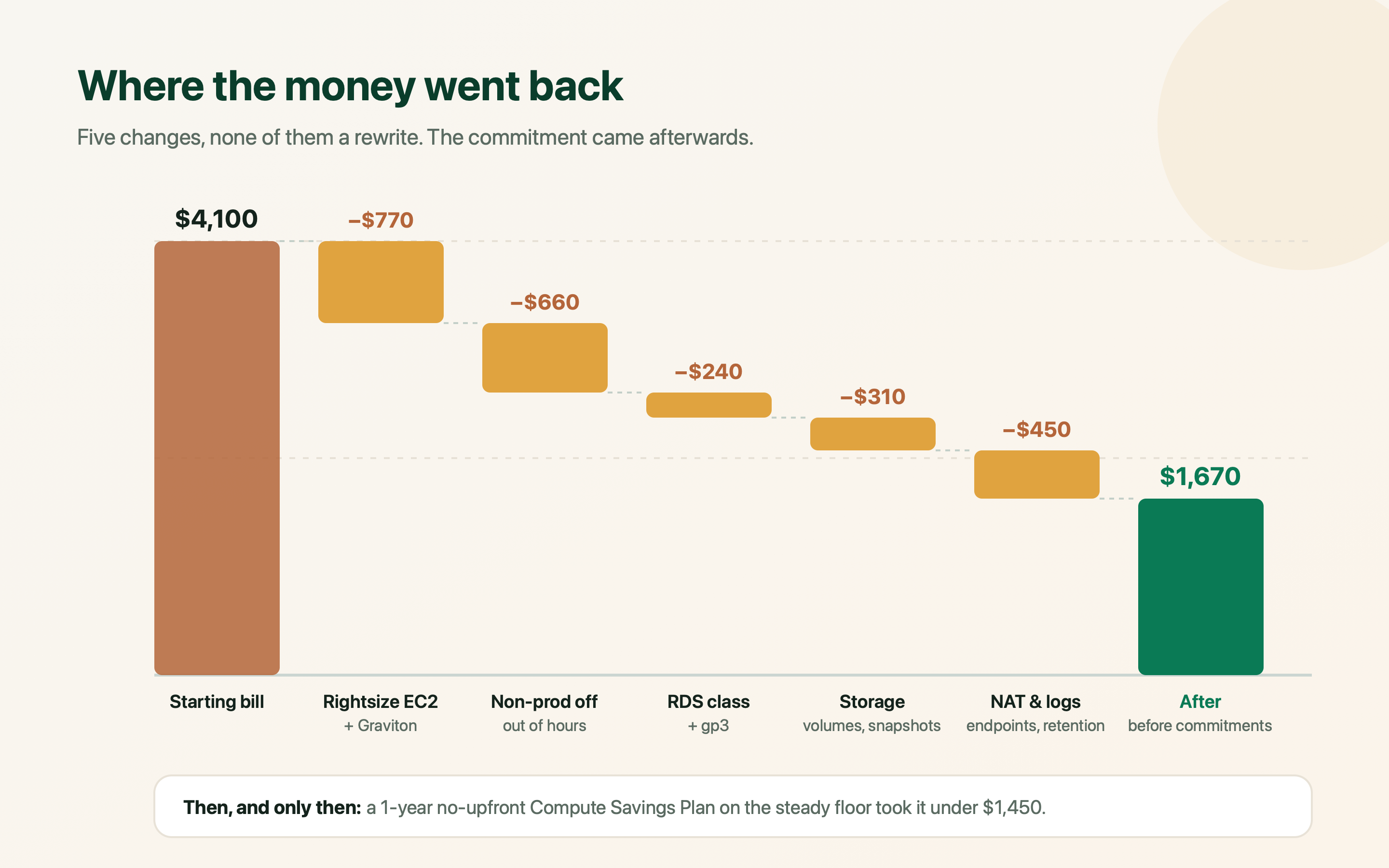
The table below is what a representative cleanup looks like end to end. The exact numbers will differ; the proportions rarely do, and the two largest cuts are both attention rather than engineering.
| Line | Before | After | What changed |
|---|---|---|---|
| EC2 (production) | $1,380 | $610 | Two instances dropped a size on p95 evidence; one service moved to Graviton. |
| Non-production EC2 + RDS | $940 | $280 | Scheduled off outside working hours; Multi-AZ turned off on staging. |
| RDS (production) | $760 | $520 | Right-sized class after a fortnight of CPU and memory data; gp3 storage. |
| EBS volumes and snapshots | $430 | $120 | Unattached volumes deleted, snapshot retention policy applied, gp2 to gp3. |
| NAT gateway and data transfer | $380 | $95 | S3 and ECR endpoints added; non-production consolidated to one NAT. |
| CloudWatch logs | $210 | $45 | Debug logging turned off in production; 30-day retention set everywhere. |
| Monthly total | $4,100 | $1,670 | Before any commitment. A 1-year Compute Savings Plan on the floor took it under $1,450. |
Frequently asked questions
What is the fastest way to cut an AWS bill without risking production?
Deletions and schedules, in that order. Unattached EBS volumes, old snapshots, idle load balancers and unassociated Elastic IPs can go today with no production impact at all. Then schedule non-production environments to run only during working hours — that alone removes around 70% of their cost. Rightsizing comes next; commitments last.
Should I buy Reserved Instances or a Savings Plan?
For most early-stage SaaS, a one-year no-upfront Compute Savings Plan is the right default: it is flexible across instance family, size and region, and it covers Fargate and Lambda as well as EC2. Reserved Instances still make sense for RDS, where the instance class tends to be stable. Either way, buy only after rightsizing, and cover your steady floor rather than your peak.
Why is my EC2-Other charge so high?
EC2-Other is mostly EBS volumes, snapshots, NAT gateway hours and data processing, and data transfer — none of which is an instance. Re-group Cost Explorer by usage type rather than service and it separates into NatGateway-Hours, NatGateway-Bytes, EBS:VolumeUsage and DataTransfer lines, each with a different and usually straightforward fix.
Is Graviton worth migrating to?
For most interpreted and JVM workloads, yes. Graviton instances price roughly 10–20% below the equivalent x86 size and AWS quotes considerably better price-performance on top. The work is a multi-architecture container build and a test pass; the risk is native dependencies that have no arm64 build. Try it on a stateless service first.
Can I reduce RDS costs without downtime?
Several of the biggest wins are non-disruptive: switching storage to gp3, deleting old manual snapshots, removing an unused read replica, and turning off Multi-AZ in non-production. Changing the instance class needs a maintenance window (shorter on Multi-AZ, which fails over), and reducing allocated storage is not possible in place — it requires a dump and restore into a right-sized instance.
How much should an early-stage SaaS be spending on AWS?
There is no universal number, which is why the useful metric is a ratio rather than an amount: infrastructure cost as a share of revenue, or cost per active tenant, tracked monthly. What matters is direction. If cost per tenant falls as you grow you have leverage; if it rises, something in the architecture is scaling linearly with customers and that is worth finding early.