Nobody ships an AI feature intending it to cost a dollar a use. It happens because the prototype was priced at zero, and the prototype is what shipped.
The call usually comes about four months after launch. The AI feature works, customers like it, and the provider invoice has grown into something that shows up in a board pack — sometimes exceeding the revenue from the plan tier that includes it.
Almost always, the fix is architectural rather than a matter of switching to a cheaper model. The same feature, the same quality, can typically be delivered for a fraction of the cost by changing what you send, how often you send it, and which model answers.
Five levers below, in the order I apply them. Each is measured against the same evaluation set, because a cost reduction you cannot show is quality-neutral is not a cost reduction — it is a quiet product regression.
Measure cost per completed action, not per token
Token pricing is the wrong unit for a product decision. A user does one thing — summarise this thread, extract these fields, answer this question — and that one thing may be six model calls, two retries and a re-rank. The number you need on a dashboard is the fully loaded cost of that action, because that is what you compare against what you charge.
Instrument it at the boundary where the calls are made. Six fields are enough: feature, tenant, model, prompt tokens, completion tokens, and a run id that ties the calls of one action together. With that you can answer the two questions that matter — which feature is expensive, and which customers are expensive — in a single query.
Then set a target before optimising. “Under eight cents per action, at most fifteen percent of the revenue this feature supports” is a target. “Cheaper” is not, and it produces endless micro-optimisation with no stopping condition.
If you cannot state your cost per action to two decimal places, every optimisation below is guesswork. Instrument first — it is half a day, and it usually finds the answer on its own.
type LlmCall = {
  runId: string          // ties every call in one user action together
  feature: string        // 'thread.summary'
  tenantId: string
  model: string
  promptTokens: number
  completionTokens: number
  cachedTokens?: number  // providers report this separately; you want it
  latencyMs: number
}

// Cost is a pure function of the above plus a price table you own.
// Keep the table in code, versioned, so historical costs stay correct
// when prices change.
export function costUsd(call: LlmCall): number {
  const p = PRICES[call.model]
  const fresh = call.promptTokens - (call.cachedTokens ?? 0)
  return (
    (fresh / 1e6) * p.inputPerM +
    ((call.cachedTokens ?? 0) / 1e6) * p.cachedInputPerM +
    (call.completionTokens / 1e6) * p.outputPerM
  )
}

// The two queries that matter, once this exists:
//   SELECT feature, sum(cost) / count(DISTINCT run_id) AS cost_per_action ...
// SELECT tenant_id, sum(cost) ... ORDER BY 2 DESC LIMIT 20Lever 1 — route by difficulty instead of using one model for everything
Most production AI features are a mix of easy and hard work, and most are built to send all of it to the strongest model available. Classification, extraction, routing, short rewrites and yes/no judgements do not need a frontier model; small models handle them at a fraction of the price per token, often an order of magnitude or more.
The pattern is a cascade. A cheap model attempts the task; if the output fails validation or the model signals low confidence, escalate to the expensive one. On the workloads I have measured, seventy to eighty-five percent of calls never escalate, which is where the first large saving comes from.
The discipline that makes it safe is an evaluation set. Two hundred real examples with known-good answers, run before and after, is enough to know whether the cheap model actually holds up on your data — and it will be better at some tasks and clearly worse at others. Route on evidence, not on the model card.
async function extract(input: string): Promise<Extraction | null> {
  // 1. Cheap model first. Most traffic stops here.
  const draft = await call(SMALL_MODEL, input, { maxTokens: 400 })
  const parsed = Extraction.safeParse(draft)

  if (parsed.success && parsed.data.confidence >= 0.8) {
    metrics.increment('extract.small.hit')
    return parsed.data
  }

  // 2. Escalate only what actually failed.
  metrics.increment('extract.escalated')
  const strong = await call(LARGE_MODEL, input, { maxTokens: 400 })
  return Extraction.safeParse(strong).data ?? null
}

// Track the escalation rate as a product metric. If it climbs above
// ~30%, the routing is not earning its complexity — or your inputs
// have changed and the eval set needs refreshing.Lever 2 — cache the part of the prompt that never changes
Most production prompts are mostly boilerplate: a long system prompt, tool definitions, formatting rules, few-shot examples. That prefix is identical on every call and you are billed for it every time.
Provider prompt caching exists precisely for this, and it is close to free money — cached prefix tokens are billed at a steep discount. The requirement is that the cached portion is a stable, byte-identical prefix, which means ordering the prompt deliberately: static content first, dynamic content last.
The mistake that silently disables it is putting something variable near the top — a timestamp, the user's name, a request id in the system prompt. One changing character at position forty invalidates everything after it. Log the provider's reported cached-token count; if it is not climbing after you enable this, something dynamic is sitting in the prefix.
- Order the prompt: static, then semi-static, then dynamic: System rules and tool definitions first, retrieved context next, the user's message last. That ordering is what makes a cache hit possible at all.
- Never put a timestamp or request id in the system prompt: It is the single most common reason caching appears not to work. If the model needs the date, pass it in the user turn.
- Watch the cached-token count, not the bill: Providers report cached tokens per call. That number, not a monthly total, tells you within minutes whether the change worked.
Lever 3 — stop paying for the whole conversation on every turn
Chat features have a particular economics problem: the entire history is resent on every turn, so a conversation's cost grows quadratically with its length. Turn twenty is not twenty times more expensive than turn one; it is far worse, and nothing in the code looks wrong.
Three fixes, in order of how much they change behaviour. A sliding window keeps the most recent turns verbatim and drops the rest — crude, but correct for most support and assistant use cases. Rolling summarisation replaces older turns with a compact summary, preserving continuity at a fraction of the tokens. Retrieval over the conversation fetches only the turns relevant to the current question, which is the best result and the most work.
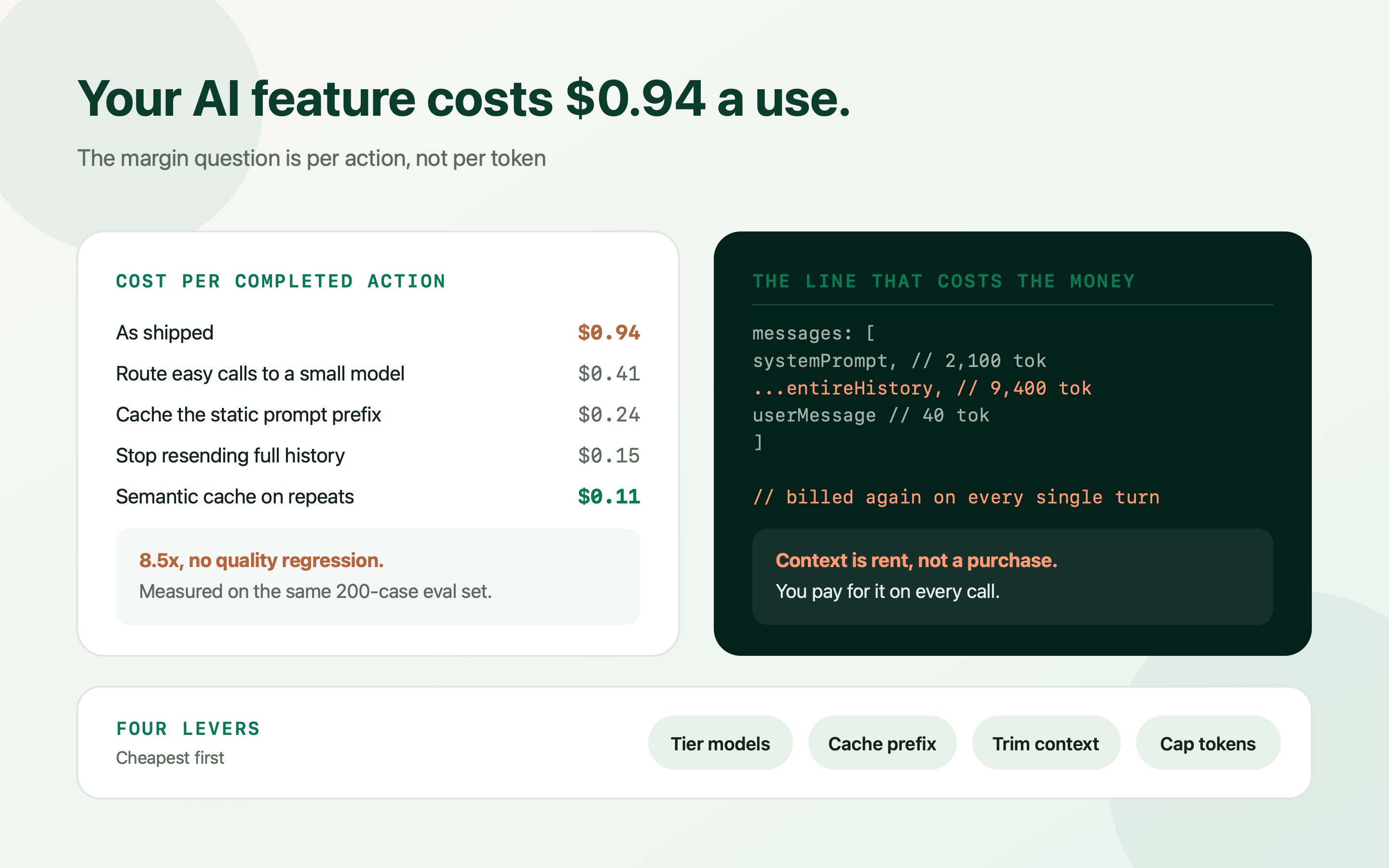
Whichever you choose, put a hard ceiling on context size and log it. Context is rent, not a purchase — you pay for it again on every single call.
const MAX_CONTEXT_TOKENS = 6_000   // a ceiling you choose, not one you discover

async function buildMessages(conv: Conversation, next: string) {
  const recent = conv.turns.slice(-6)                 // verbatim
  const older = conv.turns.slice(0, -6)

  const summary = older.length
    ? await getOrCreateSummary(conv.id, older)        // cached, updated in batches
    : null

  const messages = [
    { role: 'system', content: SYSTEM_PROMPT },       // static: cacheable prefix
    ...(summary ? [{ role: 'system', content: 'Earlier: ' + summary }] : []),
    ...recent,
    { role: 'user', content: next },
  ]

  const tokens = estimateTokens(messages)
  if (tokens > MAX_CONTEXT_TOKENS) {
    metrics.increment('context.truncated')
    return trimOldest(messages, MAX_CONTEXT_TOKENS)
  }
  return messages
}

// Summarise in a background job with the cheap model, not inline with
// the user's turn. They should never wait for cost control.Lever 4 — semantic caching, carefully
Many production workloads are far more repetitive than they look. Support assistants answer the same twenty questions in different words; classification pipelines see near-identical inputs all day. A semantic cache embeds the request, looks for a near neighbour above a similarity threshold, and returns the stored answer for nothing.
It is also the lever with the sharpest edge, and the failure mode is a security incident rather than a bad answer. The cache key must include the tenant and the permission scope of the requester. A cached answer served across tenant boundaries is a data leak, and “the embeddings were similar” is not a defence anyone will accept.
Pick the threshold empirically against your eval set — too low and you serve confidently wrong answers to subtly different questions. Set a TTL, invalidate on source-document change, and keep a kill switch. Where it fits, it is the cheapest lever available: a hit costs one embedding call and a vector lookup.
Key every cache entry by tenant and permission scope, without exception. A cross-tenant cache hit is not a cost optimisation gone wrong, it is a breach.
| Workload | Cacheable? | Key must include |
|---|---|---|
| Public FAQ or documentation answers | Yes — the best case | Locale, document version |
| Classification and routing of short text | Yes, with a high threshold | Model, prompt version |
| Answers over tenant-private documents | Only within one tenant | Tenant id, permission scope, document version |
| Anything personalised to the user | Rarely worth it | User id — at which point hit rates collapse |
| Anything that writes or takes an action | Never | — |
Lever 5 — output tokens are the expensive ones
Output is typically billed at three to five times the input rate, and it is the part teams control least deliberately. A prompt that says “explain your reasoning” and then discards the explanation is paying the premium rate for text nobody reads.
Set `max_tokens` on every call — not as a safety net, but as a design decision per endpoint. Ask for structured output rather than prose when the consumer is code. Say explicitly how long the answer should be; models comply well with an instruction to answer in under fifty words, and badly with no instruction at all.
The same applies to reasoning-style models, where thinking tokens are billed. They are worth it for genuinely hard problems and wasteful for classification. That choice belongs in your routing logic, not as a global default.
| Change | Cost per action | Risk | Effort |
|---|---|---|---|
| As shipped | $0.94 | — | — |
| Route easy calls to a small model | $0.41 | Quality regression if unmeasured — needs an eval set | 1–2 days |
| Cache the static prompt prefix | $0.24 | None, if nothing dynamic is in the prefix | Hours |
| Window + summarise history | $0.15 | Loses long-range context if the window is too small | 1 day |
| Semantic cache on repeats | $0.11 | Real, if cache keys omit tenant scope | 1–2 days |
| Cap and structure output | included above | Low — occasionally truncates long answers | Hours |
Do small or local models actually pay?
Running your own small model is the option founders ask about most and the one that most often fails to pay at this stage. The arithmetic is not about tokens, it is about whether you can keep a GPU busy.
A hosted GPU billed by the hour costs the same whether it serves ten requests or ten thousand. Below fairly high sustained volume, per-token API pricing wins comfortably — and that comparison ignores the engineering time to serve, monitor, update and evaluate a model you now own. For most SaaS companies, that time is the more expensive resource.
Where it does pay: very high volume, highly repetitive, narrow tasks — classification, embedding generation, PII redaction, extraction against a fixed schema — especially when data residency rules make an external API awkward. Measure the break-even with your real volume before building anything, and treat it as a hybrid rather than a migration: local for the narrow high-volume task, API for everything that needs reasoning.
- Compute the break-even in GPU-hours, not tokens: Monthly API spend on the candidate task, against the hourly cost of a GPU big enough to serve it at peak. If the GPU sits idle half the day, it is losing.
- Embeddings are the best first candidate: High volume, small model, no reasoning, and completely deterministic — the easiest workload to move without a quality argument.
- Count the ops cost honestly: Serving, autoscaling, version upgrades, evaluation and on-call. If you do not have someone to own it, the savings are theoretical.
Make the budget part of the system, not a monthly surprise
Cost controls that live in a spreadsheet get read once. Controls that live in the code stop the incident before you hear about it.
Three of them, all small. A per-tenant daily quota, enforced server-side, so one customer's automation cannot consume a month of budget in an afternoon. A circuit breaker on spend rate that degrades the feature — smaller model, cached answers only, or a clear “temporarily unavailable” — rather than either failing hard or billing without limit. And an alert on cost per action, not on total spend, because total spend going up while cost per action falls is exactly what growth should look like.
Put cost in CI as well. If your evaluation suite reports dollars per run alongside quality scores, a prompt change that quietly triples token usage shows up in a pull request instead of an invoice.
export async function guardedCall(ctx: Ctx, req: LlmRequest) {
  // 1. Per-tenant daily ceiling, enforced where the money is spent
  const spentToday = await budget.spentUsd(ctx.tenantId)
  if (spentToday >= ctx.plan.dailyLlmBudgetUsd) {
    throw new QuotaExceeded('llm.daily', ctx.plan.dailyLlmBudgetUsd)
  }

  // 2. Global circuit breaker: degrade rather than fail or overspend
  if (await breaker.isOpen('llm.spend_rate')) {
    return degradedAnswer(req)      // cached or small-model response
  }

  const res = await call(req)
  await budget.record(ctx.tenantId, costUsd(res))
  return res
}

// 3. In CI, alongside quality:
//    eval: 200 cases | pass 96.5% | $0.41 per run | +$0.06 vs main
Frequently asked questions
How do I work out what an AI feature actually costs me?
Log six fields at every call — run id, feature, tenant, model, prompt tokens, completion tokens — and compute cost from a price table you keep in code. Then divide by distinct run ids to get cost per completed action. Per-token pricing is not a product metric; cost per action is the number you compare against what you charge.
Which saves more: a cheaper model or better caching?
Routing usually saves the most, because it moves the majority of traffic to a model priced an order of magnitude lower. Prompt caching is the cheapest to implement and carries almost no risk. Do caching first because it takes hours and cannot regress quality, then routing with an evaluation set to prove the small model holds up on your data.
Why does prompt caching not seem to work for me?
Nearly always because something dynamic sits in the cached prefix — a timestamp, a user name, a request id in the system prompt. Caching requires a byte-identical prefix, so one changing character invalidates everything after it. Order the prompt static first, dynamic last, and watch the provider's reported cached-token count rather than waiting for the invoice.
Is semantic caching safe in a multi-tenant product?
Only if every cache key includes the tenant and the requester's permission scope. Otherwise a similar question from a different customer can return an answer built from data they must not see, which is a breach rather than a bug. Add a TTL, invalidate on document change, and keep a kill switch.
Should I self-host a small model to cut costs?
Only for narrow, very high-volume, repetitive tasks — classification, embeddings, extraction against a fixed schema — and only after computing the break-even in GPU-hours against current API spend. A GPU costs the same idle as busy, and the engineering time to serve, monitor and evaluate your own model is usually the larger expense at SaaS scale.
How do I stop one customer running up the bill?
Enforce a per-tenant daily spend quota server-side, cap max_tokens on every call, and add a circuit breaker that degrades the feature when the spend rate crosses a threshold. Alert on cost per action rather than total spend — total going up while cost per action falls is healthy growth, and an alert that fires on growth is an alert people learn to ignore.